What is Reference in GTD? What to keep and where it goes
Reference is the GTD list for things you keep but never act on, like manuals, receipts and meeting notes. What belongs in it and what doesn't, how clarifying the Inbox fills it, why you don't review it weekly, and how it works in GTD Brain.
Start free for a month →No charge for your first month · Cancel anytime
On this page
In GTD (Getting Things Done), Reference is where you keep things you might need later but don't have to act on: the dishwasher manual, the receipt for a new laptop, how to get online at the cabin, your notes from a meeting. None of them asks you to do anything. You only want to find them again when the dishwasher breaks or a warranty question comes up.
Why GTD keeps Reference separate
David Allen sorts everything you capture into two kinds: things you have to act on and things you don't. Your action lists (Next Actions, Projects, Waiting For) should hold only the first kind. If a manual sits on your Next Actions list, you read past it every time you look for something to do, and the list slowly stops being a list of actions.
Throwing that material away doesn't work either. Then you end up searching your email for the insurance policy number on the day you need it. Reference gives it a home that stays out of your way and is easy to search.
What belongs in Reference
Anything worth keeping that needs no action:
- Manuals and warranties
- Receipts you might need for a return or a tax claim
- Account numbers, router instructions and where to find a password (keep the passwords themselves in a password manager)
- Meeting notes and project background
- An article you want to read again
And what doesn't:
- Anything with a next step. “Insurance renews in March, compare quotes” is an action, so it goes in Next Actions, or in Projects if it takes several steps.
- Ideas you might act on one day. Those go in Someday/Maybe, which you look at every week.
- Things you would never miss. If you can't picture looking it up, delete it.
How items get there: the clarify step
Most Reference items start in the Inbox. When you clarify the Inbox, you ask of each item whether it's actionable. If it isn't, you can delete it, park it in Someday/Maybe, or keep it as Reference.
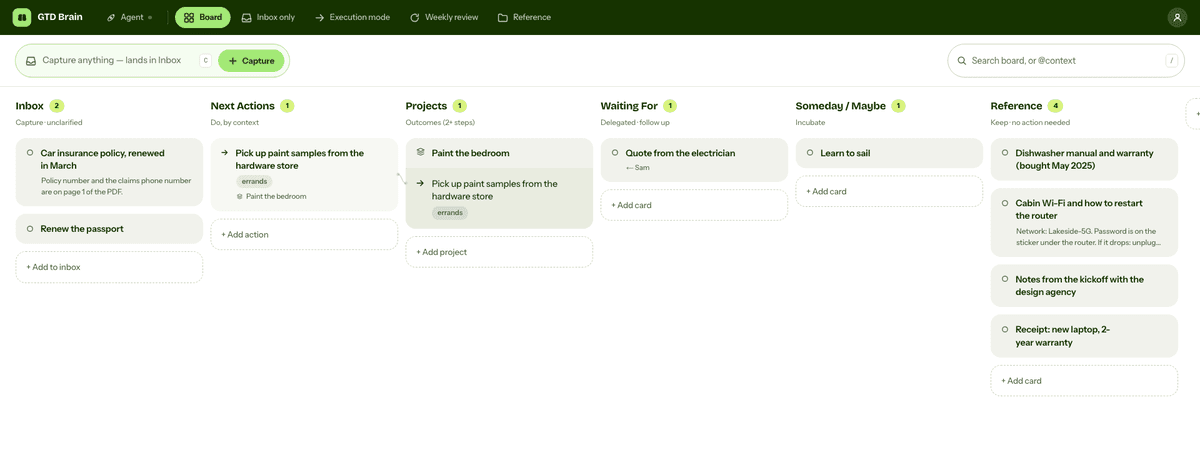
Take “Car insurance policy, renewed in March”. The renewal is done, so there is nothing to do. You will still want the policy number if you ever make a claim, so it goes to Reference.
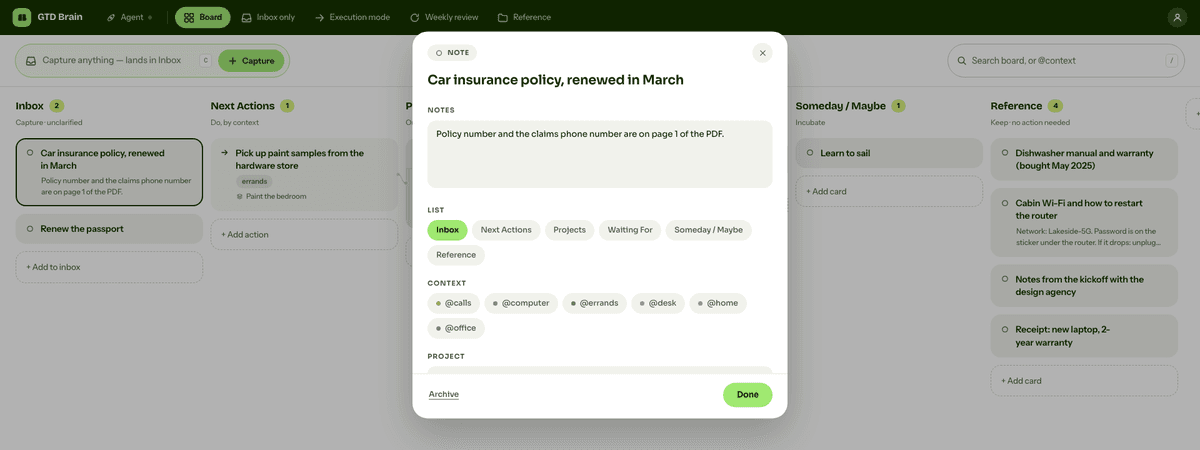
If you already know something needs no action when you come across it, you can skip the Inbox and file it in Reference straight away.
How and when you review it
You don't review it. The weekly review covers the Inbox, your projects, next actions, Waiting For and Someday/Maybe. Reference is left out because nothing in it is a commitment that can slip.
What keeps Reference useful is search. Give each item a title you would search for later, and put the details in its notes. When you happen to open the list and see something you no longer need, delete it then.
Reference in GTD Brain
In GTD Brain, Reference is a column on the board, right after Someday / Maybe. The Reference button in the top nav opens it on its own, and clicking a card shows its notes.
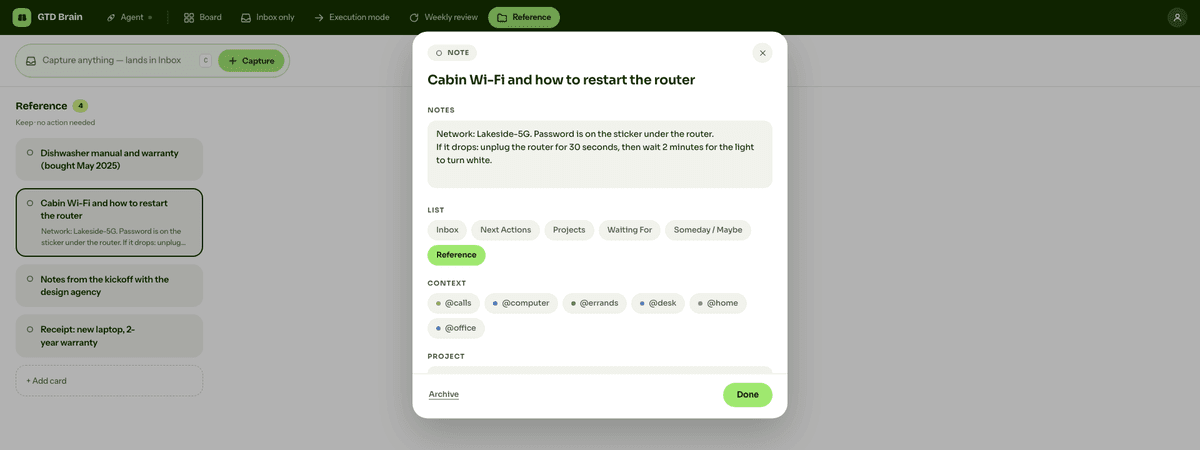
To clarify an Inbox card into Reference, open it and pick Reference under List. To add a card directly, use “+ Add card” at the bottom of the Reference column. To find something later, press / and search the board. Search looks at card titles and notes.
GTD Brain's weekly review skips Reference. On the board above, with four Reference cards, the review counts only the other six. When you clarify a card during the review, Reference is one of the “Move to” buttons.
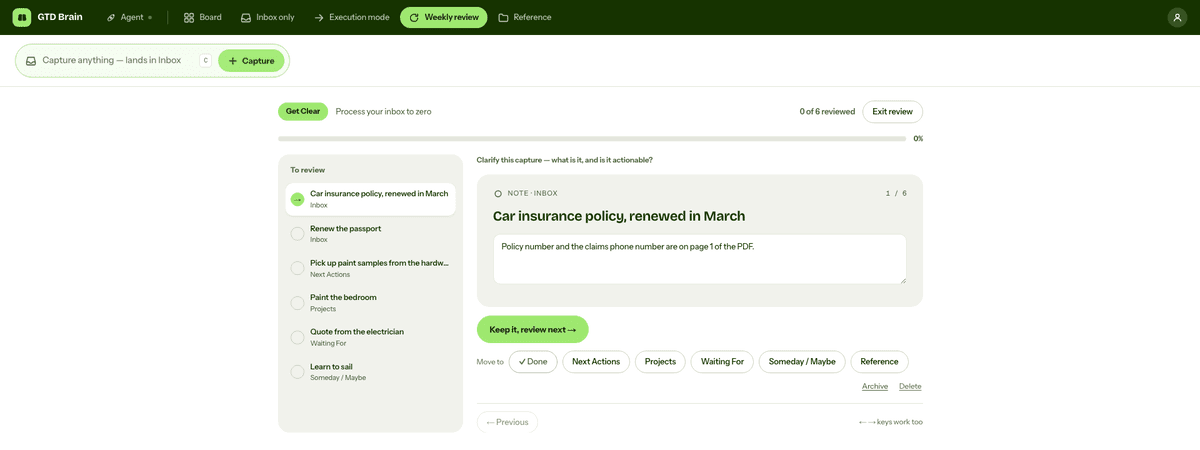
The same Reference list is in the Android and iPhone apps. In ChatGPT or Claude, with GTD Brain connected, you can ask to save something to your Reference list and the assistant files it there.
If you want the method without the workarounds
Everything above is real GTD, and plenty of people run it in a notes app for years. I built GTD Brain for the parts that keep breaking: it is a board with the GTD lists built in (Inbox, Next Actions with contexts, Projects, Waiting For, Someday), a built-in agent that clarifies your inbox into next actions, and a guided weekly review that walks you through the whole board card by card. The same board is on the iPhone app, the Android app and the web, and you can talk to it from ChatGPT, Claude and other assistants through the assistant connections.
You sign in with an email code, no password. The yearly plan starts with a free month and you can cancel before it bills. If you have read this far, you already know how the lists work, so the setup takes about two minutes: sign in at gtdbrain.com and do your first brain dump into the inbox.
Questions people ask
What is Reference in GTD?
Reference is the list for material worth keeping that needs no action, such as manuals, warranties, receipts, account details and meeting notes. It keeps that information out of your action lists, so Next Actions only holds things to do, while still letting you find it again when you need it.
What is the difference between Reference and Someday/Maybe in GTD?
Someday/Maybe holds things you might act on later, like learning to sail, and you look at it during every weekly review to decide what to start. Reference holds information you will never act on, only look up, like the dishwasher manual, so it is not part of the review.
Do you review Reference in the GTD weekly review?
No. The weekly review covers the Inbox, projects, next actions, Waiting For and Someday/Maybe, because those hold commitments that can slip. Reference holds none, so it is left out. Keep it useful by giving each item a searchable title, and delete things you no longer need when you come across them.
How do items get into the Reference list?
Usually through the clarify step. When you empty the Inbox, you ask whether each item is actionable. If it is not, you delete it, move it to Someday/Maybe, or keep it as Reference. You can also file something straight into Reference when you already know it needs no action.
Start free for a month →No charge for your first month · Cancel anytime